Turn property information, floor plans, and room photos into visuals that are easier for buyers to understand.
Dehome gives real estate agents practical AI tools for property marketing — from showing the layout of a home to staging an empty room and presenting renovation potential.
New users can start with free credits and test the tools on their own property images.
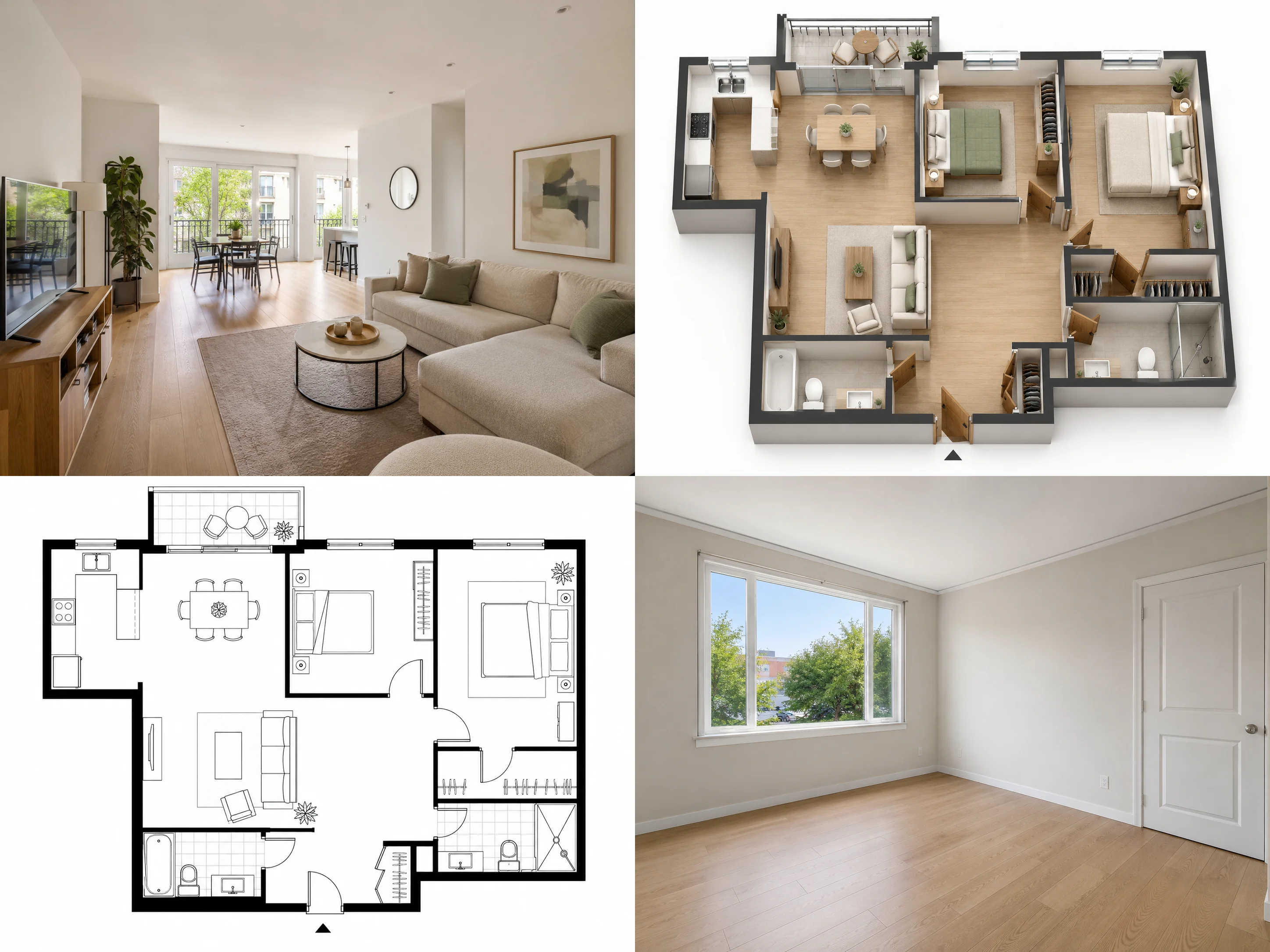
Make Property Listings Easier to Understand
A listing can have good photos and still leave buyers with basic questions.
Where is the second bedroom in relation to the living room?
Does the kitchen connect directly to the dining area?
What could an empty room be used for?
Would an outdated interior feel different after renovation?
This is where AI for real estate agents can be useful.
Instead of relying on room photos alone, agents can add visual context that helps buyers understand both the current property and its potential.
Dehome can support property marketing with:
- Floor plans
- 3D layout visuals
- Furnished room concepts
- Renovation visualizations
- Lighting adjustments
- Presentation-ready property images
The aim is not to alter what a property is. It is to communicate the space more clearly.
How Real Estate Agents Use AI for Property Marketing
Show Buyers How the Property Is Laid Out
Individual photos rarely explain how a whole property fits together.
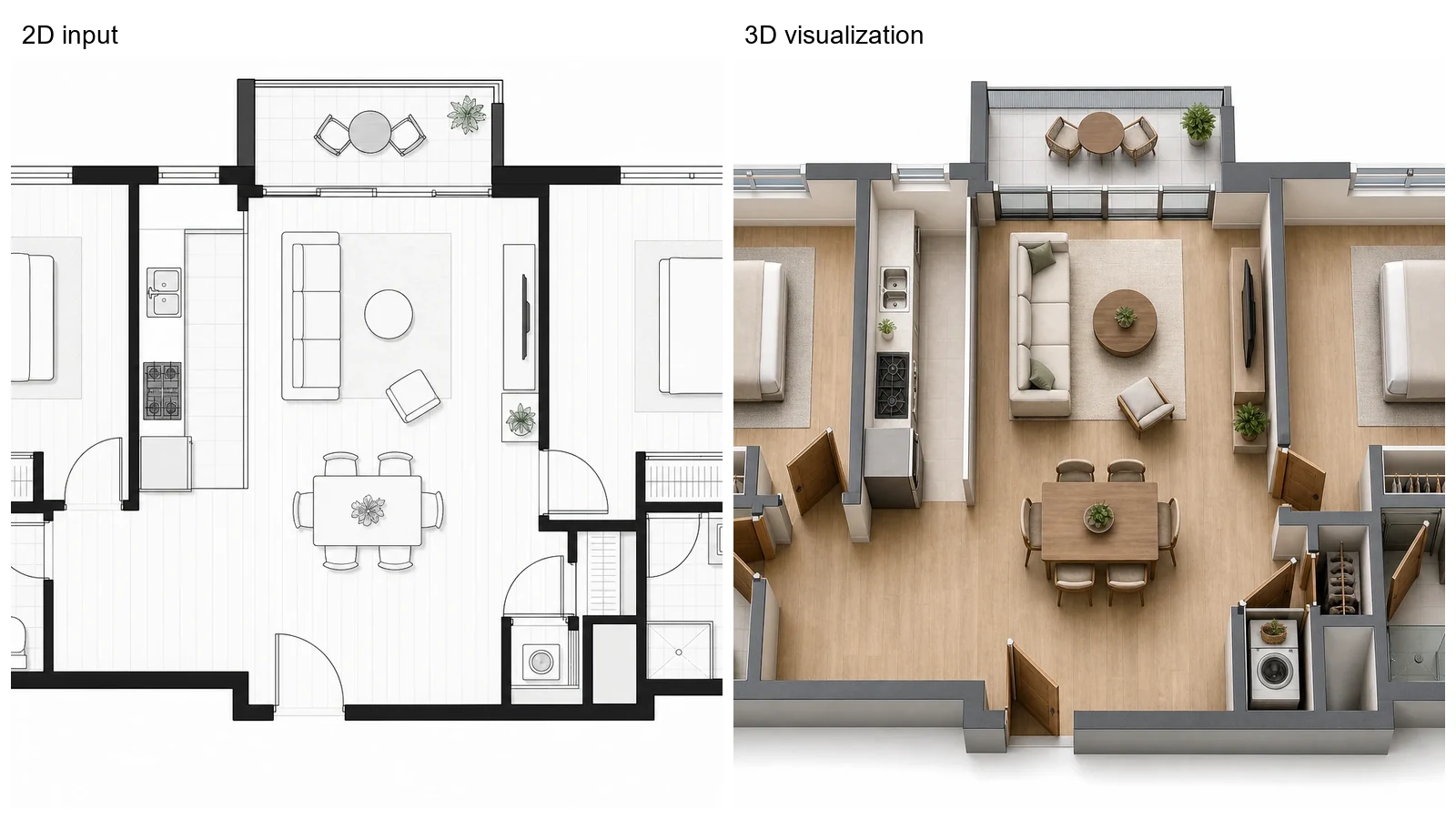
A floor plan gives buyers a reference for room relationships, circulation, and overall layout.
When verified property information is available, use the AI Floor Plan Generator to create an initial visual layout.
You can then use 3D Floor Plan to turn an existing plan into a more accessible spatial view.
A 3D layout can help buyers see:
- How bedrooms relate to common areas
- Where the kitchen and dining areas connect
- How rooms are reached from the entrance
- How furniture might fit within the layout
- Whether a property has distinct private and shared zones
For agents, these are supporting visuals for a listing or presentation — not substitutes for verified surveys or approved property plans.
Stage Empty Rooms for Property Listings
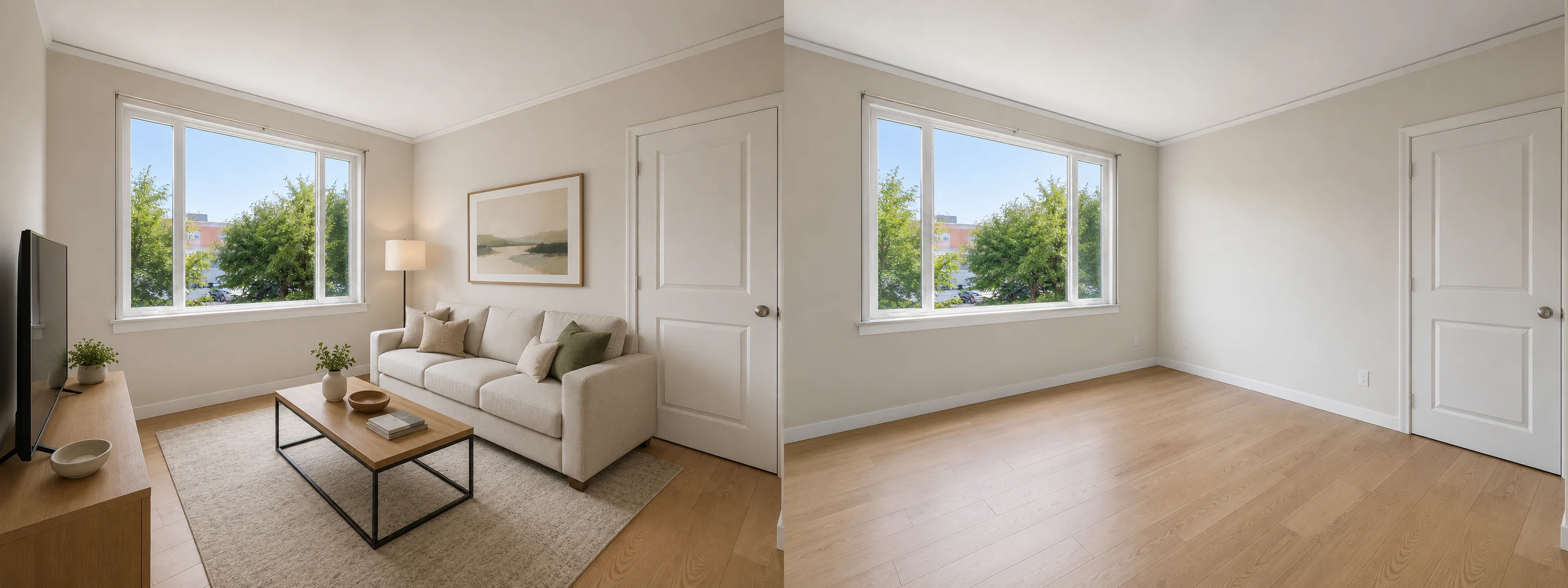
Empty rooms can be difficult to read from a photograph.
Without furniture, buyers may struggle to judge the intended use of a room or imagine how it could feel once occupied.
Virtual staging for real estate agents can provide a visual reference without physically furnishing the property.
Use the AI Room Decorator to explore a furnished direction from an empty or lightly furnished room photo.
For example, an empty room could be presented as:
- A living room
- A bedroom
- A home office
- A dining area
- A simple furnished rental space
Virtual staging for real estate listings should remain clearly distinguishable from photographs of the property's actual condition.
Permanent architectural features, room dimensions, windows, doors, and defects should not be misrepresented.
Show Renovation Potential Without Hiding Current Condition
Show Renovation Potential Without Hiding Current Condition
Some properties have a good layout but dated finishes.
In these cases, buyers may understand what the property looks like today but have difficulty imagining what it could become.
Use AI Interior Design to create a visual renovation concept from an existing room photo.
This can be useful for:
- Older residential listings
- Fixer-upper properties
- Investment properties
- Development presentations
- Conversations with buyers who plan to renovate
The current property photo and the conceptual visualization should serve different purposes.
Show the real condition first, then use the AI-generated image to illustrate one possible direction.
Visualize Renovation Potential
Prepare More Consistent Listing Images
A property photo taken on a dark day may look very different from the rest of a listing.
Use Change Room Light to explore a clearer lighting presentation while preserving the visible room and its features.
This can help when:
- One interior photo is significantly darker than the others
- A room needs a clearer daylight presentation
- You want to compare daytime and warmer lighting moods
- A presentation contains images taken under inconsistent lighting
Lighting edits should improve presentation, not conceal defects or create features that do not exist.
How to Use AI for Real Estate Marketing
Using AI for real estate marketing works best when each visual answers a specific buyer question.
1. Start with Accurate Property Information
Collect the material already available for the listing:
- Property photographs
- Existing floor plans
- Verified room information
- Property dimensions
- Listing details
- Notes on current condition
AI should build on accurate source material rather than replace it.
2. Identify What Buyers May Not Understand
Look at the listing from a buyer's perspective.
Is the layout unclear?
Is an empty room difficult to interpret?
Does an outdated interior hide the potential of the property?
Are important photos too dark?
Choose the visual that solves that specific problem.
3. Create the Supporting Visual
Depending on the listing, this could be:
- A floor plan
- A 3D floor plan
- A virtually staged room
- A renovation concept
- A lighting-adjusted interior photo
There is no need to use every tool for every property.
4. Keep Current Condition and Concepts Clear
Buyers should be able to tell which images show the existing property and which are conceptual or AI-edited.
For virtual staging and renovation concepts, clear labeling helps avoid confusion.
5. Build a More Complete Property Presentation
Combine the strongest visuals with the listing information buyers already expect.
For example:
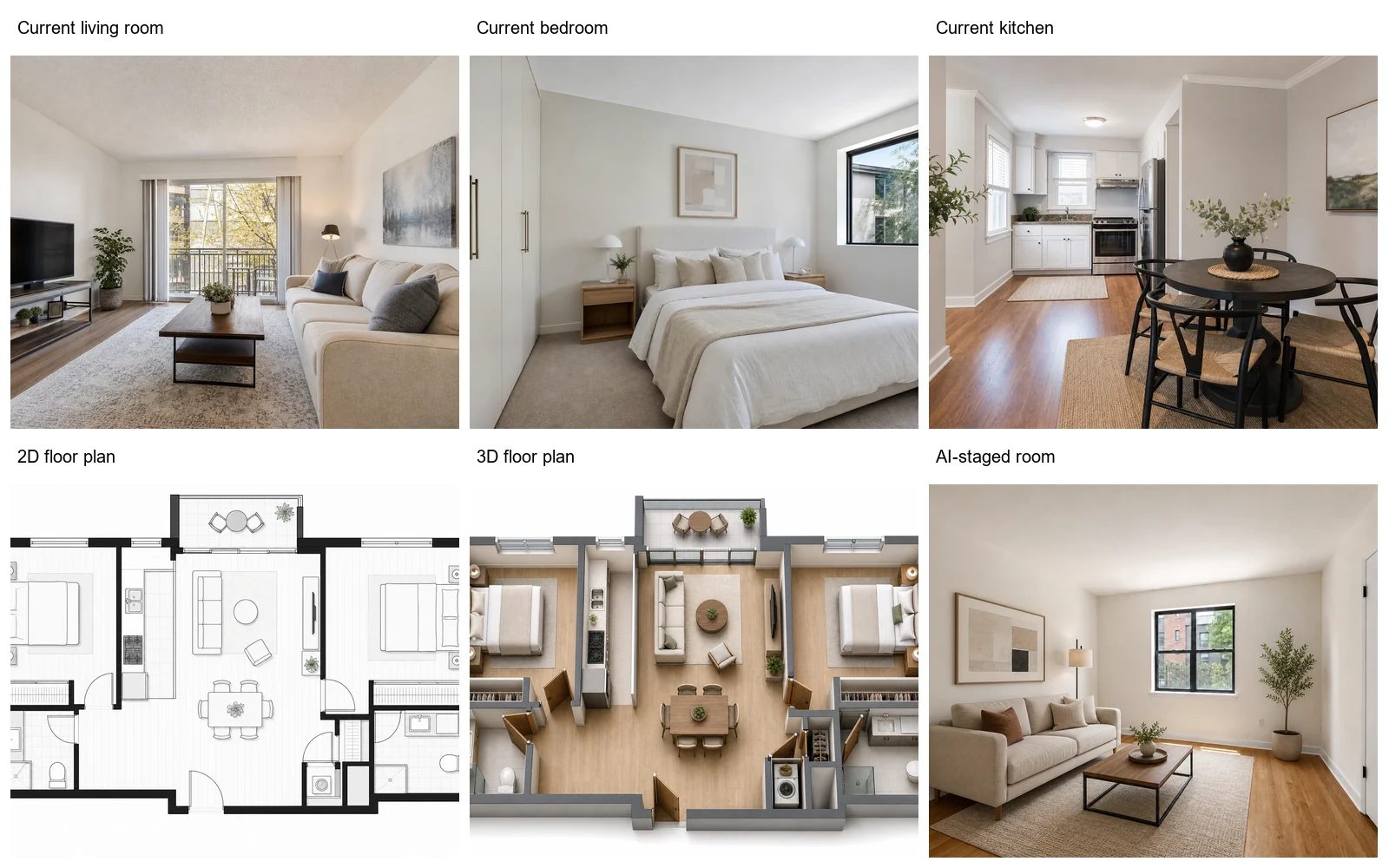
Current photos → Floor plan → 3D layout → Staged or renovation concept → Property details
This gives buyers both factual context and a clearer visual understanding of the space.
Real Estate AI Tools for Different Listing Tasks
AI Floor Plan Generator
Create an initial layout when you need a clear visual reference for a property or development concept.
Best for: layout communication and early property presentations.
3D Floor Plan
Turn an existing 2D plan into a more visual representation of the property.
Best for: helping buyers interpret room relationships and circulation.
AI Room Decorator
Add a furnished visual direction to an empty or outdated room.
Best for: virtual staging and showing possible room use.
AI Interior Design
Show one possible renovation direction while keeping the current property presentation separate.
Best for: communicating renovation potential.
Change Room Light
Explore a clearer or more consistent lighting presentation.
Best for: improving the visual consistency of listing materials.
Example: From Basic Listing to Clearer Property Presentation
The Property
A two-bedroom apartment is being prepared for sale.
The listing has several room photos, but there is no clear floor plan. The second bedroom is empty, and the living room appears dark in one of the photographs.
The Problem
A buyer looking at the listing may understand each room individually but still have questions:
- How does the living room connect to the kitchen?
- Where is the second bedroom?
- Is the empty room large enough to work as a bedroom or office?
- Does the living room receive enough light?
The Workflow
1. Add layout context
Create a floor plan using verified property information.
2. Make the layout easier to read
Turn the approved plan into a 3D property visual.
3. Give the empty room context
Create a furnished version that shows one realistic use of the room.
Keep the original photo alongside the staged version.
4. Improve the presentation of the dark photo
Adjust the lighting without changing permanent features or hiding the room's condition.
5. Assemble the listing materials
The final presentation contains:
- Current property photos
- Verified floor plan
- 3D layout
- Clearly identified staged visualization
- Property details
The result is not a different property.
It is a listing that gives buyers more context before they decide whether to arrange a viewing.
Where AI Fits in Real Estate Marketing
AI is most useful when it helps explain or present information buyers might otherwise struggle to visualize.
Useful for
- Property listing visuals
- Floor plan presentation
- 3D property layouts
- Virtual staging
- Showing possible room uses
- Renovation concepts
- Listing image preparation
- Buyer and investor presentations
It should not replace
- Verified measurements
- Professional surveys
- Approved architectural plans
- Legal property documents
- Required disclosures
- Structural assessments
- Accurate descriptions of property condition
AI-generated or materially edited visuals should be used transparently.
The original property information remains the source of truth.
Frequently Asked Questions
How can real estate agents use AI?
Real estate agents can use AI to improve how properties are presented and explained.
Common uses include creating property layouts, turning floor plans into 3D visuals, staging empty rooms, showing renovation potential, and preparing clearer listing images.
What AI tools are useful for real estate agents?
Useful AI tools for real estate agents include floor plan tools, 3D property visualization, virtual staging, interior visualization, and image-editing tools for listing presentation.
The right tool depends on what a buyer needs help understanding about the property.
How can AI help with real estate marketing?
AI for real estate marketing can add visual context to listing materials.
For example, an agent can use a floor plan to explain the layout, virtual staging to show how an empty room might be used, or a renovation concept to illustrate the potential of an outdated interior.
Are there free AI tools for real estate agents?
Some AI services allow users to try their tools before purchasing a paid plan.
Dehome gives new users free credits, so agents can test property visualization tools with their own images before deciding whether they need additional credits or features.
What is virtual staging for real estate agents?
Virtual staging adds furniture and decor to an image of an empty or lightly furnished property to help viewers understand how the space might be used.
The staged image should be presented clearly as a visualization rather than as a photograph of the property's current condition.
Can I use virtual staging for real estate listings?
Yes, virtual staging for real estate listings can help buyers interpret empty spaces and imagine possible room uses.
Keep the staging realistic, preserve permanent architectural features, and make the edited nature of the image clear.
Can AI-generated images replace real property photos?
No.
Real property photos should remain the primary record of the property's current appearance.
AI-generated images are better used as supporting visuals for staging, renovation concepts, or other clearly identified possibilities.
Can AI floor plans replace verified property plans?
No.
AI-generated layouts can support early visualization and presentation, but dimensions and room arrangements should be checked against verified property information before they are used as factual listing materials.
Give Buyers More Context Before the Viewing
Use Dehome to explain layouts, stage empty rooms, show renovation potential, and prepare clearer property visuals for your next listing.
New users can start with free credits and explore the tools on their own property images.